移动端H5开发问题梳理

移动端适配

vw/vh + rem 结合动态计算根字体大小

1. rem 配合动态根字体大小

让 1rem 的大小,永远跟着屏幕宽度自动变化

1
2
3
4
5
6
7
8
html {
--screen-width: var(--fallback-screen-width, 100vw);
/* 根字体大小 = 视口宽度 / 3.75 */
font-size: calc(var(--safe-width) / 3.75);
}
body {
font-size: 0.16rem; /* 业务层使用 rem 作为单位 */
}

2. 现代视口单位兼容(dvw/dvh)

  • dvw/dvh(动态视口单位)规避移动端 “刘海屏 / 导航栏” 占用视口的问题;
  • 通过 @supports 做特性检测,仅在支持 dvh 的浏览器中替换为 dvw/dvh,向下兼容不支持的设备(仍用 vw/auto)。
1
2
3
4
5
6
@supports (height: 100dvh) {
html {
--screen-width: 100dvw;
--screen-height: 100dvh;
}
}

3. 宽高比约束(媒体查询做场景优化)

针对 “横屏 / 大屏设备” 做比例约束,避免适配过度拉伸:

1
2
3
4
5
6
7
8
9
10
11
12
/* 当宽高比 ≥ 9/16、宽度 ≥ 480px 时 (横屏时、宽屏高度低的场景,宽度强制通过高度计算出)*/
@media (min-aspect-ratio: 0.5625) and (min-width: 480px) and (min-height: 667px) {
html {
--safe-width: calc(var(--screen-height, 100vh) / 16 * 9); /* 强制 16:9 比例 */
}
}
/* 小屏手机横屏 + 老机型横屏场景:限制最小宽度为 375px */
@media (min-aspect-ratio: 0.5625) and (min-width: 480px) and (max-height: 667px) {
html {
--safe-width: 375px;
}
}

与原生native通信

见:JSBridge实现原理

实现类似native页面的体验

1. image标签可选中问题

imageIcon + backgroundimage实现

2. 文字可选中问题

user-select:none

3. 拦截页面缩放事件

1
2
3
4
5
6
7
8
9
10
11
12
13
14
15
16
17
18
19
20
21
22
23
24
25
26
27
28
29
30
31
32
33
34
35
36
37
38
39
40
41
42
43
44
45
46
47
48
49
50
51
52
53
54
55
56
57
58
59
60
61
62
63
64
65
66
67
68
69
70
function disablePageZoom() {
// iOS Safari/WebView gesture events
document.addEventListener(
"gesturestart",
(event) => {
event.preventDefault();
},
{ passive: false }
);
document.addEventListener(
"gesturechange",
(event) => {
event.preventDefault();
},
{ passive: false }
);
document.addEventListener(
"gestureend",
(event) => {
event.preventDefault();
},
{ passive: false }
);

// Multi-touch pinch zoom
document.addEventListener(
"touchstart",
(event) => {
if (event.touches.length > 1) {
event.preventDefault();
}
},
{ passive: false }
);
document.addEventListener(
"touchmove",
(event) => {
if (event.touches.length > 1) {
event.preventDefault();
}
},
{ passive: false }
);

// Double-tap zoom
let lastTouchEnd = 0;
document.addEventListener(
"touchend",
(event) => {
const now = Date.now();
if (now - lastTouchEnd <= 300) {
event.preventDefault();
}
lastTouchEnd = now;
},
{ passive: false }
);

// Some browsers still zoom via Ctrl/Cmd + wheel.
document.addEventListener(
"wheel",
(event) => {
if (event.ctrlKey || event.metaKey) {
event.preventDefault();
}
},
{ passive: false }
);
}

H5分享

实现分享到微信、分享到微信朋友圈、复制链接分享
难点主要是要H5页的分享逻辑在不同环境下要分别处理

1. H5嵌入APP

实现方案:

  • 点击右上角分享按钮时,H5 通过 JSBridge 把分享相关数据传给 App
  • App 调用微信SDK,把分享结果回传给 H5(成功/取消/失败)

2. H5嵌入微信环境(wx webview、wx小程序)

顶部导航栏分享,转发给朋友、分享到朋友圈

实现方案:接入微信JSSDK H5在微信浏览器中分享好友和朋友圈

3. H5嵌入外部浏览器后分享

外部浏览器分享到微信,复制链接到聊天工具内

实现方案:OG协议

4. 通用的分享 Hooks:适配 App / 微信环境 / 站外

APP 内:通过 JSBridge 调原生分享能力(由 App 拉起微信分享面板)
微信环境:配置微信 JSSDK 的分享信息(用户点击微信菜单/系统分享)
站外浏览器:优先 navigator.share,不支持则兜底复制链接

示例代码

1
2
3
4
5
6
7
8
9
10
11
12
13
14
15
16
17
18
19
20
21
22
23
24
25
26
27
28
29
30
31
32
33
34
35
36
37
38
39
40
41
42
43
44
45
46
47
48
49
50
51
52
53
54
55
56
57
58
59
60
61
62
63
64
65
66
67
68
69
70
71
72
73
74
75
76
77
78
79
80
81
82
83
84
85
86
87
88
89
90
91
92
93
94
95
96
97
98
99
100
101
102
103
104
105
106
107
108
109
110
111
112
113
114
115
116
117
118
119
120
121
122
123
124
125
126
127
128
129
130
131
132
133
134
import { useCallback, useEffect, useMemo, useState } from "react";

type ShareScene = "session" | "timeline";

type SharePayload = {
title: string;
desc: string;
link: string;
imageUrl: string; // 建议是 https 绝对地址
};

type ShareStatus = "idle" | "preparing" | "success" | "failed";

function isWeChatBrowser() {
const ua = navigator.userAgent || "";
return /MicroMessenger/i.test(ua);
}

function isInApp() {
// 这里按你们项目实际桥接对象改一下:window.Native / window.NativeBridge / 等
return !!(window as any).Native || !!(window as any).NativeBridge;
}

async function copyText(text: string) {
await navigator.clipboard.writeText(text);
}

// 1) APP 分享:走 JSBridge(示例,method/入参按你们客户端协议改)
async function appShare(payload: SharePayload, scene: ShareScene) {
const Native = (window as any).Native;
if (typeof Native !== "function") {
throw new Error("bridge not found");
}

// 示例:很多项目里 share 可能叫 'share' 或 'SHARE'
// 这里按你们实际 method 替换。scene 字段也可能叫 shareType。
const res = await Native("share", {
scene, // session / timeline
title: payload.title,
desc: payload.desc,
link: payload.link,
imageUrl: payload.imageUrl,
});

if (!res || res.code !== 0) {
throw new Error(res?.msg || "native share failed");
}
}

// 2) 微信环境:配置 JSSDK 分享数据(通常不能“直接弹出分享面板”,而是设置菜单内容)
function setupWeChatShare(payload: SharePayload) {
const wx = (window as any).wx;
if (!wx) throw new Error("wx sdk not ready");

// 注意:wx.ready 之前通常需要你们页面已完成 wx.config + 签名
wx.updateAppMessageShareData?.({
title: payload.title,
desc: payload.desc,
link: payload.link,
imgUrl: payload.imageUrl,
// success/fail 会在用户触发分享后回调(视 SDK 行为而定)
});

wx.updateTimelineShareData?.({
title: payload.title,
link: payload.link,
imgUrl: payload.imageUrl,
});
}

// 3) 站外:优先 system share,否则复制链接兜底
async function webShareFallback(payload: SharePayload, scene: ShareScene) {
// navigator.share 只能触发系统分享,不保证是“分享到微信好友/朋友圈”
if (navigator.share) {
await navigator.share({
title: payload.title,
text: payload.desc,
url: payload.link,
});
return;
}
await copyText(payload.link);
}

export function useMobileShare(payload: SharePayload) {
const [status, setStatus] = useState<ShareStatus>("idle");

const env = useMemo(() => {
const wechat = isWeChatBrowser();
const app = isInApp();
return { wechat, app };
}, []);

// 微信环境:建议在页面初始化时就把分享数据配好
useEffect(() => {
if (!env.wechat) return;
try {
setupWeChatShare(payload);
} catch {
// 微信 SDK 可能还没 ready,忽略即可(后续可在 wx.ready 里补齐)
}
}, [env.wechat, payload]);

const share = useCallback(
async (scene: ShareScene = "session") => {
setStatus("preparing");
try {
if (env.app) {
await appShare(payload, scene);
setStatus("success");
return;
}

if (env.wechat) {
// 微信环境通常是“配置分享数据 + 用户点击菜单”才生效
// 所以这里不强制触发,而是确保 setup 已完成
setupWeChatShare(payload);
setStatus("success");
return;
}

await webShareFallback(payload, scene);
setStatus("success");
} catch (e) {
setStatus("failed");
// 这里按你的埋点/Toast 习惯处理
console.warn("share failed:", e);
}
},
[env.app, env.wechat, payload]
);

return { share, status };
}

使用示例

1
2
3
4
5
6
7
8
9
10
11
12
13
14
15
16
17
import React from "react";
import { useMobileShare } from "./useMobileShare";

export default function SharePage() {
const { share, status } = useMobileShare({
title: "hahaha",
desc: "有事搜一搜,没事看一看",
link: "https://example.com/activity?from=share",
imageUrl: "https://example.com/share.jpg",
});

return (
<button onClick={() => share("session")} disabled={status === "preparing"}>
{status === "preparing" ? "分享中..." : "分享"}
</button>
);
}

站外H5唤起APP

同样也是要区分

H5离线包方案

离线包方案

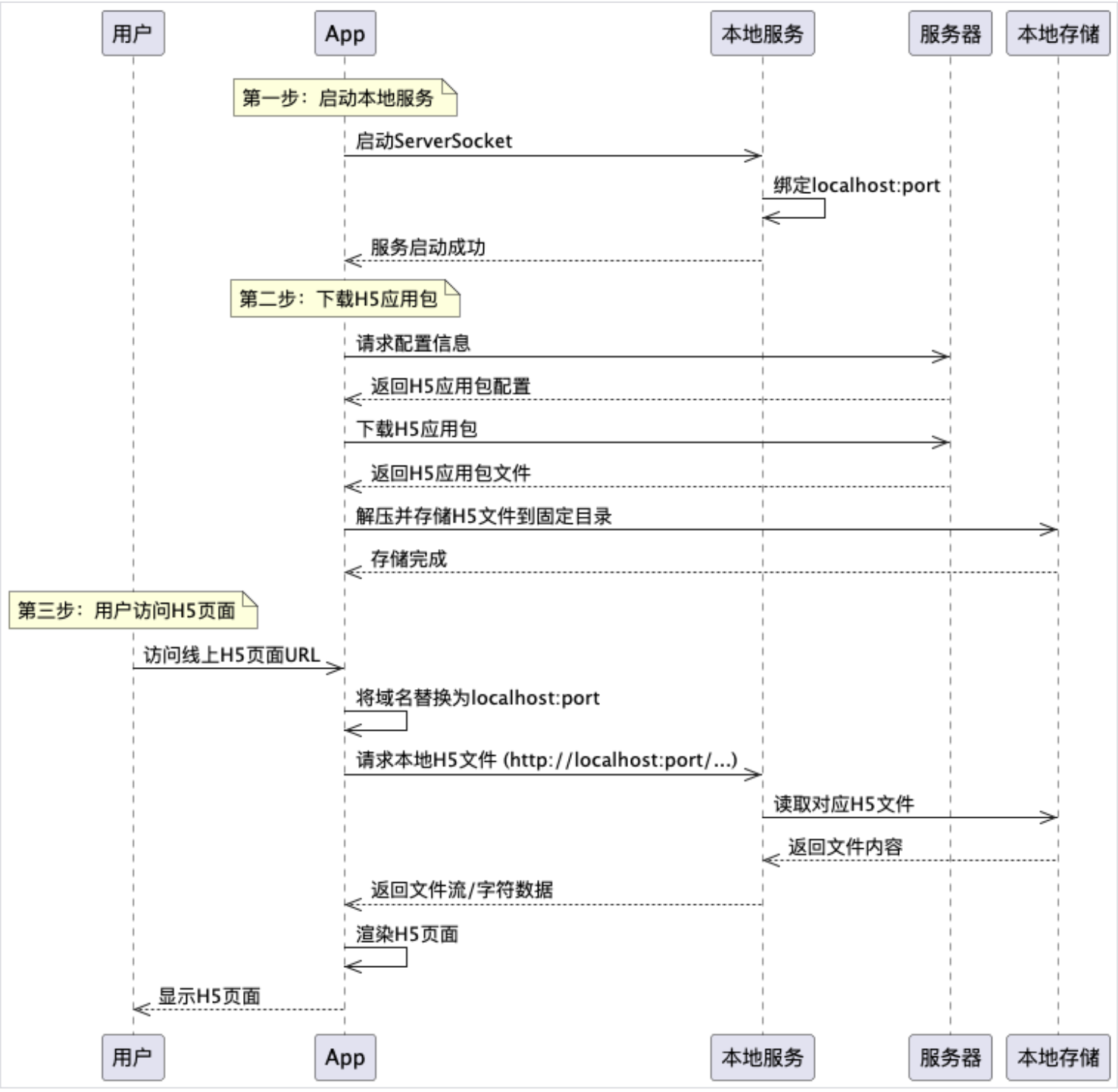
整体流程:

  • 前端打包资源,资源会带上Appid、版本号
  • APP端启动时会去拉取最新的版本号,拷贝最新的H5静态资源到APP里(本质上就是APP做了Nginx的那些事)
  • APP启动会时会去启动一个本地服务器
  • 用户访问H5时,WebView 通过“本地 URL / 重写请求路径到localhost,通过本地服务器返回资源
  • 若命中,返回
  • 若没命中,返回内置的离线包

往返缓存

详细见:

字体文件分割

移动端页面真机调试