ProseMirror学习
ProseMirror
- prosemirror-model
- prosemirror-state
- prosemirror-view
- prosemirror-transform
Schema
Schema 描述的是:这篇文档允许出现哪些结构——能有哪些节点(Node)、哪些标记(Mark),以及它们之间如何嵌套、谁里能装谁
创建 Schema 大致是
1 | new Schema({ |
Schema 由两部分 Spec 组成,实例化后会编译成可查询的类型表:
Nodes
- 必须包含一个根节点(通常叫
doc),Schema 会把它记为schema.topNode,代表整篇文档的最外层类型。 content:内容表达式,规定该节点允许哪些子节点、以什么顺序出现(语法类似正则,如block+表示至少一个 block,inline*表示 0 个或多个 inline)。group:给节点打标签,便于在content里按组引用(如paragraph标为block,text标为inline)。inline/block与 HTML 的 inline / block 概念相近;tile(如后文的block_tile)则是业务自定义分组,并非 ProseMirror 内置。
Marks
- 描述可叠加在文本上的样式或语义(加粗、链接等),不参与文档的树形嵌套,而是附着在 inline 内容上。
编译结果
schema.nodes/schema.marks:由名字查到NodeType/MarkType,类型对象上已解析好 content 规则、默认属性等,后续用它们创建文档节点。
协同文档相关学习
实现一个极简富文本编辑器
一个最基础的富文本编辑器应该具备以下能力:
- 文本格式化:加粗、斜体、下划线、颜色、背景色等多种文本样式。
- 多媒体插入:图片、视频、文件、链接等。
- 撤销重做:用户在编辑过程中可以随时撤销和重做操作。
- 跨浏览器兼容性:在不同浏览器和平台上行为一致。
- 协作功能:多用户实时协作,显示协同光标和实时文档同步。
contenteditable
contenteditable属性
- 可以使任何元素变为可编辑状态。通过设置 contenteditable=”true”,用户可以直接在元素内输入或删除文本。
- 常用于构建富文本编辑器的编辑区域,简单高效。
示例
1 | <div class="editor-content" contenteditable="true"> |
浏览器 execCommand
document.execCommand 是一种浏览器 API,用于在 HTML 文档中执行与文档内容相关的命令。该方法最初是为实现富文本编辑功能而设计的,可以让开发者轻松实现一些常见的编辑操作,如加粗文本、插入链接、剪切、复制、粘贴等。尽管这种方法在过去非常流行,但随着 Web 技术的发展,它的使用逐渐减少,并在一些现代浏览器中被标记为过时或即将废弃。
基本语法
1 | document.execCommand(command, showUI, value); |
- command (字符串): 要执行的命令名称,如 ‘bold’、’italic’、’copy’ 等。
- showUI (布尔值): 指示是否显示默认的用户界面,通常传入 false,因为许多命令都不支持或忽略这个参数。
- value (字符串): 与某些命令一起使用的值,如在插入链接时的 URL。对于不需要值的命令,该参数可以省略或传入 null。
常见命令
Selection + Range + Compiler
编辑器个性需求
@ 提及
/ 推荐补全
知识图谱
编辑器框架
L0:主要依赖 contentEditable、document.execCommand、浏览器自带行为
L1:仍大量用 DOM/浏览器能力,但用 MVC/自定义模型(如 Slate、Quill、CKEditor 5 等常被归在这一档的讨论里)
L2:再往上,编辑管线更自研,体验与可控性目标更接近桌面字处理
协同编辑核心实现
协同化的前提
协同底层传输协议
- web socket
- socket io
协同数据类别
- 头像、光标
- 业务核心数据
数据冲突
- OT
- CRDT
- 面向过程
- 面向状态、操作
常见方案
前端部署相关
极简部署
手写一个简单的静态资源服务器
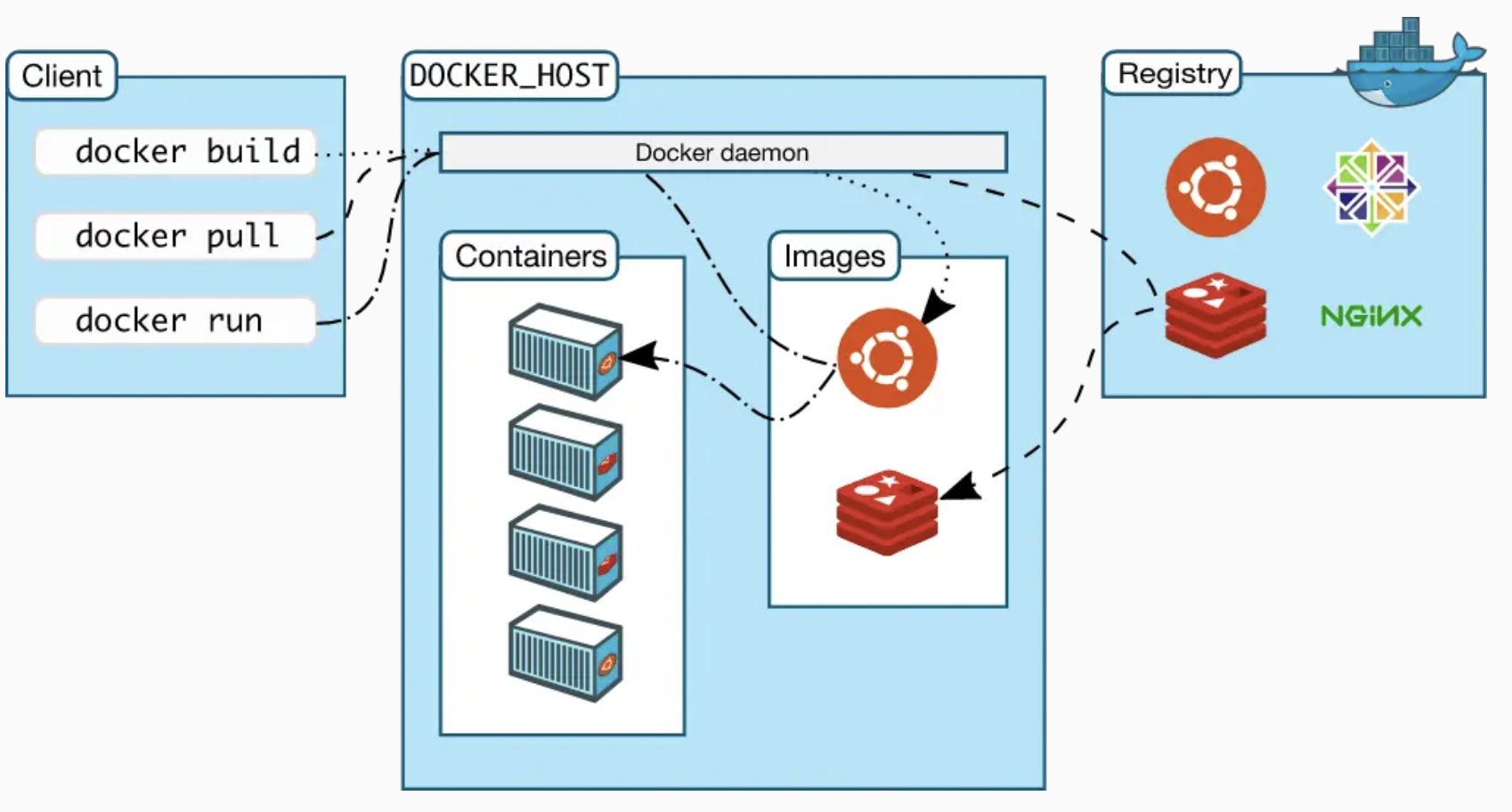
基于 docker/docker-compose 对极简项目的部署
基于Nginx镜像的部署
单页应用部署
单页应用的静态资源
所有的前端单页应用对于部署,最重要的就是构建静态资源,也就是npm run build
一个最简单的Dockerfile:
1 | FROM node:14-alpine |
这样其实就已经完成构建了,然而还可以针对以下两点进行优化:
- 构建镜像时间过长,优化构建时间
- 构建镜像文件过大,优化镜像体积
移动端H5开发问题梳理
移动端适配
vw/vh + rem 结合动态计算根字体大小
1. rem 配合动态根字体大小
让 1rem 的大小,永远跟着屏幕宽度自动变化
1 | html { |
2. 现代视口单位兼容(dvw/dvh)
- dvw/dvh(动态视口单位)规避移动端 “刘海屏 / 导航栏” 占用视口的问题;
- 通过 @supports 做特性检测,仅在支持 dvh 的浏览器中替换为 dvw/dvh,向下兼容不支持的设备(仍用 vw/auto)。
1 | @supports (height: 100dvh) { |
JSBridge实现原理
JSBridge是什么
JSBridge本质就是:Web端和客户端Native之间的通信桥梁,让混合开发模式中的Web端和Native端能够互相通信,实现双向调用。
Web端调用Native端
在Webview中注入JS API
通过WebView提供的接口,App将Native的相关接口注入到JS的Context(window)的对象中
Web端就可以直接在全局 window 下使用这个暴露的全局JS对象,进而调用原生端的方法
Android注入方法:
addJavascriptInterface配合@JavascriptInterface:Android 4.2+ 配合 @JavascriptInterface 才安全可用
IOS注入方法:
WKWebView + WKScriptMessageHandler是 iOS 官方方案,推荐新项目优先使用,链路更清晰。WebViewJavascriptBridge是常见历史封装方案,接入快、兼容旧项目,但初始化握手和调试成本更高。
Nginx学习
Nginx是什么
Nginx 是一个高性能的 Web 服务器和反向代理服务器
最常见的作用有这几个:
- 静态资源服务器:直接返回 html/js/css/img
- 反向代理:把请求转发给后端服务(Node/Java/Python)
- 负载均衡:把流量分发到多台后端
- 网关能力:HTTPS 终止、重定向、缓存、压缩(gzip/brotli)、跨域头等
Nginx的配置文件
在 nginx 中,其中比较重要的有以下几个文件,它们都是有层层关联的:
/etc/nginx/nginx.conf/etc/nginx/conf.d/default.conf
/etc/nginx/nginx.conf
nginx 主配置文件,引用了 /etc/nginx/conf.d/ 目录下的所有配置文件。
1 | user nginx; |
/etc/nginx/conf.d/default.conf
1 | server { |
/usr/share/nginx/html
默认的静态资源目录,其目录下的 index.html 就是 nginx 的欢迎页面。
1 |
|
利用Docker启动Nginx镜像
1 | docker run -it --rm -p 9000:80 nginx:alpine |
root和index
- root: 静态资源的根路径。见文档 https://nginx.org/en/docs/http/ngx_http_core_module.html#root
- index: 当请求路径以 / 结尾时,则自动寻找该路径下的 index 文件。见文档 https://nginx.org/en/docs/http/ngx_http_index_module.html#index
location
location 用以匹配路由,配置语法如下
location [ = | ~ | * | ^ ] uri { … }
其中 uri 前可提供以下修饰符
- = 精确匹配,优先级最高。
- ^~ 前缀匹配,优先级其次。如果同样是前缀匹配,走最长路径。
- ~ 正则匹配,优先级再次 (~* 只是不区分大小写,不单列)。如果同样是正则匹配,走第一个路径。
- / 通用匹配,优先级再次。
location修饰符
location优先级
proxy_pass
proxy_pass 反向代理,也就是用来解决跨域的配置
当使用 proxy_pass 代理路径时,有两种情况
1. 转发时 保留 /api 路径
1 | location /api/ { |
结尾没有 / 斜杠
前端请求:/api/user –> 转发到后端:http://localhost:3000/api/user
2. 转发时 去掉 /api 路径
1 | location /api/ { |
末尾加 / 斜杠
前端请求:/api/user –> 转发到后端:http://localhost:3000/user
1 | server { |
add_header
控制响应头。
很多特性都是通过响应头控制,因此基于此指令可做很多事情,比如:
Cache
CORS
HSTS
CSP
…
Cache
1 | location /static { |
CORS
1 | location /api { |
HSTS
HTTPS,SSL相关
1 | location / { |
CSP
1 | location / { |
最佳实践
- /index.html:304
- /assets/*.[hash].(js|css|…):一年强缓存 + immutable
- gzip/brotli 开启
- SPA try_files 回退
- redirect、rewrite配置
- HTTPS + HTTP2 + 基础安全头
- 发布前 nginx -t,发布后灰度验证
缓存
1 | # HTML 走协商缓存(每次都向服务端校验) |
接口转发解决跨域
Gzip压缩
1 | # 开启 gzip |
History路由
1 | location / { |
Redirect重定向
Redirect(重定向):告诉浏览器“去另一个 URL”,浏览器地址栏会变,状态码通常是 301/302/307/308
使用场景:
- 域名跳转(a.com -> b.com)
- 协议跳转(http -> https)
- 旧链接永久迁移(SEO 友好,用 301/308)
1 | location = /old-path { |
Rewrite重写
Rewrite(重写):Nginx 在服务器内部改 URI 去匹配资源,通常不告诉浏览器,地址栏不变
使用场景:
- SPA 回退(try_files $uri /index.html 本质类似内部重写思路)
- 历史路径内部兼容映射
- 隐藏后端真实路径结构
1 | location /old/ { |
限制访问source-map文件
1 | # 禁止访问 sourcemap |
实现业务逻辑
比如实现移动端跳转xx链接,pc端不变
1 | server { |
黑白名单配置
比特币
不要被学术界的思维限制了头脑,不要被程序员的思维限制了想象力。
比特币中的密码学
比特币中的哈希特性
Collision resistance (抗哈希碰撞)
没有高效的方法来人为的制造哈希碰撞
- Collision resistance的定义:给定X,没有高效的方法找到Y,使得H(X) = H(Y)
- Collision resistance的特性:无法用数学证明
- MD5哈希函数:以前认为是Collision resistance,后来被鉴定为不安全的哈希函数,可通过人为的方式制造哈希碰撞
- 比特币中使用的哈希函数:SHA-256(Secure Hash Algorithm)
Hiding
哈希的过程单向不可逆
- Hiding的定义:输入值的空间够大,且分布均匀,取值可能性相同
实际场景如何实现Hiding(保证分布均匀):输入值 + 随机数(输入X || nonce随机数)后经过Hash
Puzzle friendly
事先无法知道什么样的输入能得到一个什么样的哈希值,只能一个个尝试
比如挖矿,H(nonce + block header) <= target,没有捷径,只能去尝试多个nonce来找到解 => proof of work
比特币中的账户管理
非对称加密(asymmetric encryption algorithm):加密解密不用同一个密钥,加密用公钥,解密用私钥
去中心化,每个用户本地自己生成一组公钥和私钥,公钥相当于银行账号,私钥相当于账号密码
比特币交易过程中,为了能知道交易是由谁发起,需要用私钥将交易签名,公钥验证
两个人生成的公钥私钥相同怎么办(256位的值,产生两组相同公钥私钥的概率微乎其微)
message取hash->hash取签名