ProseMirror学习

ProseMirror

  • prosemirror-model
  • prosemirror-state
  • prosemirror-view
  • prosemirror-transform

Schema

原文:https://prosemirror.net/docs/ref/#model.Document_Schema

Schema 描述的是:这篇文档允许出现哪些结构——能有哪些节点(Node)、哪些标记(Mark),以及它们之间如何嵌套、谁里能装谁

创建 Schema 大致是

1
2
3
4
new Schema({
nodes: { doc, paragraph, text, /* ... */ },
marks: { strong, link, /* ... */ },
})

Schema 由两部分 Spec 组成,实例化后会编译成可查询的类型表:

Nodes

  • 必须包含一个根节点(通常叫 doc),Schema 会把它记为 schema.topNode,代表整篇文档的最外层类型。
  • content:内容表达式,规定该节点允许哪些子节点、以什么顺序出现(语法类似正则,如 block+ 表示至少一个 block,inline* 表示 0 个或多个 inline)。
  • group:给节点打标签,便于在 content 里按组引用(如 paragraph 标为 blocktext 标为 inline)。inline / block 与 HTML 的 inline / block 概念相近;tile(如后文的 block_tile)则是业务自定义分组,并非 ProseMirror 内置。

Marks

  • 描述可叠加在文本上的样式或语义(加粗、链接等),不参与文档的树形嵌套,而是附着在 inline 内容上。

编译结果

  • schema.nodes / schema.marks:由名字查到 NodeType / MarkType,类型对象上已解析好 content 规则、默认属性等,后续用它们创建文档节点。
1
2
3
4
5
6
7
8
9
10
11
12
13
14
15
16
17
18
19
20
21
22
23
24
25
26
27
28
29
30
31
32
33
34
35
36
37
38
39
40
41
42
43
44
45
46
47
48
49
50
51
52
53
54
55
56
57
58
59
60
61
62
63
64
65
66
67
68
69
70
71
72
73
74
75
76
77
78
import { Schema } from 'prosemirror-model';

export const schema = new Schema({
nodes: {
// 整个文档
doc: {
// 文档内容规定必须是 block 类型的节点(block 与 HTML 中的 block 概念差不多) `+` 号代表可以有一个或多个(规则类似正则)
content: 'block+'
},
// 文档段落
paragraph: {
// 段落内容规定必须是 inline 类型的节点(inline 与 HTML 中 inline 概念差不多), `*` 号代表可以有 0 个或多个(规则类似正则)
content: 'inline*',
// 分组:当前节点所在的分组为 block,意味着它是个 block 节点
group: 'block',
// 渲染为 html 时候,使用 p 标签渲染,第二个参数 0 念做 “洞”,类似 vue 中 slot 插槽的概念,
// 证明它有子节点,以后子节点就填充在 p 标签中
toDOM: () => {
return ['p', 0]
},
// 从别处复制过来的富文本,如果包含 p 标签,将 p 标签序列化为当前的 p 节点后进行展示
parseDOM: [{
tag: 'p'
}]
},
// 段落中的文本
text: {
// 当前处于 inline 分株,意味着它是个 inline 节点。代表输入的文本
group: 'inline'
},
// 1-6 级标题
heading: {
// attrs 与 vue/react 组件中 props 的概念类似,代表定义当前节点有哪些属性,这里定义了 level 属性,默认值 1
attrs: {
level: {
default: 1
}
},
// 当前节点内容可以是 0 个或多个 inline 节点
content: 'inline*',
// 当前节点分组为 block 分组
group: 'block',
// defining: 特殊属性,为 true 代表如果在当前标签内(以 h1 为例),全选内容,直接粘贴新的内容后,这些内容还会被 h1 标签包裹
// 如果为 false, 整个 h1 标签(包括内容与标签本身)将会被替换为其他内容,删除亦如此。
// 还有其他的特殊属性,后续细说
defining: true,
// 转为 html 标签时,根据当前的 level 属性,生成对应的 h1 - h6 标签,节点的内容填充在 h 标签中(“洞”在)。
toDOM(node) {
const tag = `h${node.attrs.level}`
return [tag, 0]
},
// 从别处复制进来的富文本内容,根据标签序列化为当前 heading 节点,并填充对应的 level 属性
parseDOM: [
{tag: "h1", attrs: {level: 1}},
{tag: "h2", attrs: {level: 2}},
{tag: "h3", attrs: {level: 3}},
{tag: "h4", attrs: {level: 4}},
{tag: "h5", attrs: {level: 5}},
{tag: "h6", attrs: {level: 6}}
],
}
},
// 除了上面定义 node 节点,一些富文本样式,可以通过 marks 定义
marks: {
// 文本加粗
strong: {
// 对于加粗的部分,使用 strong 标签包裹,加粗的内容位于 strong 标签内(这里定义的 0 与上面一致,也念做 “洞”,也类似 vue 中的 slot)
toDOM() {
return ['strong', 0]
},
// 从别的地方复制过来的富文本,如果有 strong 标签,则被解析为一个 strong mark
parseDOM: [
{ tag: 'strong' },
],
}
}
})

从现象看,prosemirror 会寻找到第一个定义的 block 元素来初始化默认的 state。因此,在定义 schema 的时候,需要注意两点:

  • Schema 中必要的节点要定义
  • 节点的定义顺序可能会影响编辑器初始内容

schema中的工具方法

  • schema.cached 中绑定的 domParser 可以将 dom 节点解析为 node 节点
  • domSerializer 可以将 node 内容序列化为 dom 节点。

Node

对于 Node 的类型,只有两种,即 block 与 inline

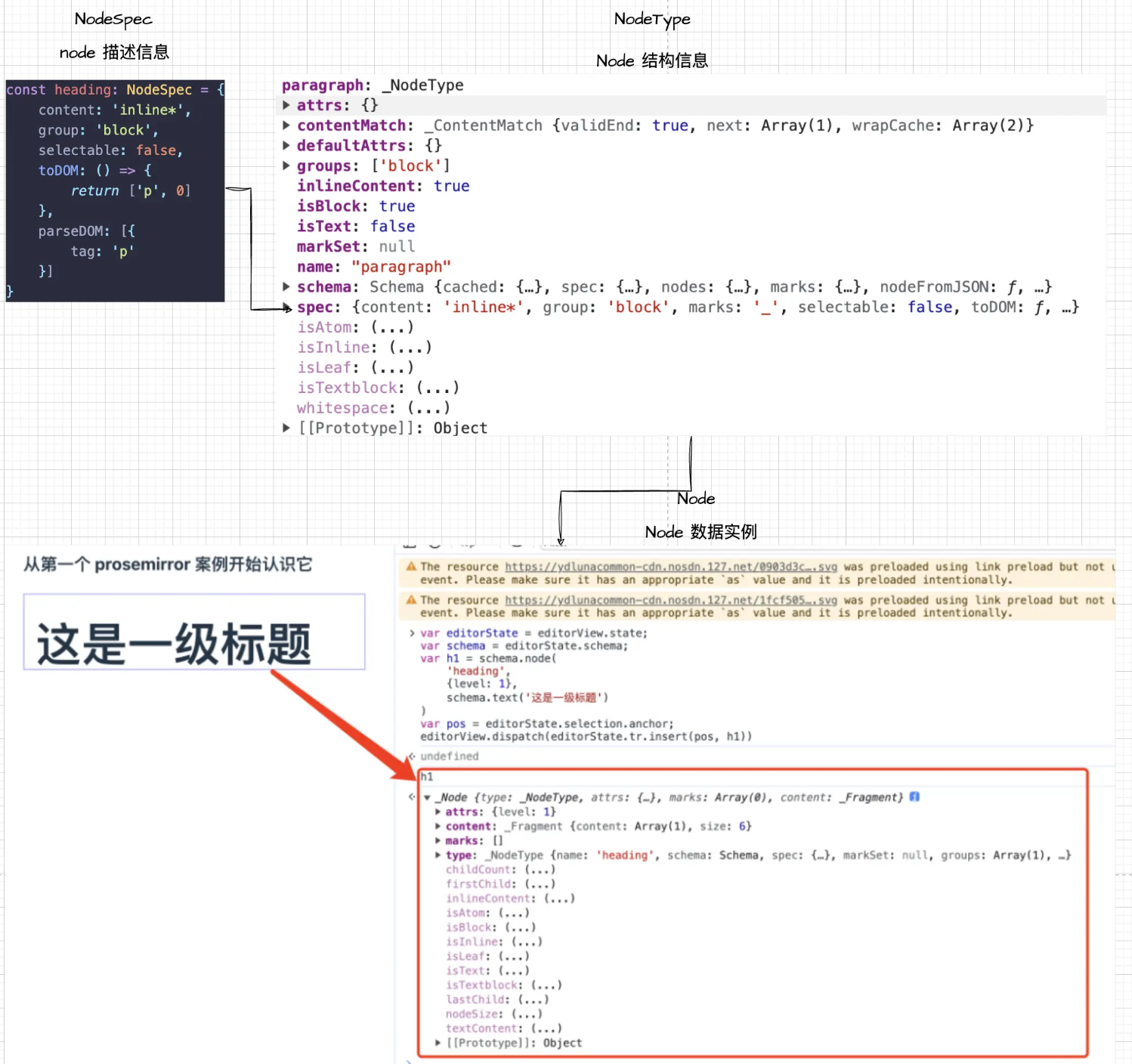
NodeType、NodeSpec、Node概念

  • NodeSpec 就是之前在 Schema 中填写的 Node 相关的描述
  • NodeType 是 Schema 实例化过程中,根据传入的 nodeSpec 规格说明书创建的 NodeType 实例,可以认为是 node 数据的工厂,后续所有的 node 类型都需要遵循它的定义,它也能像帮我们创造出一个 node 数据
  • 最后生成的 Node 实例则是文档中对应到 dom 的一个具体数据

node

inline 元素与 block 元素不能混合,即 content 里面要么只能是 inline 类型的,要么只能是 block 类型的,不能混合排列,如 paragraph|text* 就会报错。

定义Node

1
2
3
4
5
6
7
8
9
10
11
12
13
14
15
{
// 段落内容规定必须是 inline 类型的节点(inline 与 HTML 中 inline 概念差不多), `*` 号代表可以有 0 个或多个(规则类似正则)
content: 'inline*',
// 分组:当前节点所在的分组为 block,意味着它是个 block 节点
group: 'block',
// 渲染为 html 时候,使用 p 标签渲染,第二个参数 0 念做 “洞”,类似 vue 中 slot 插槽的概念,
// 证明它有子节点,以后子节点就填充在 p 标签中
toDOM: () => {
return ['p', 0]
},
// 从别处复制过来的富文本,如果包含 p 标签,将 p 标签序列化为当前的 p 节点后进行展示
parseDOM: [{
tag: 'p'
}]
},

通过API插入Node

1
2
3
4
5
6
7
8
9
10
11
12
13
14
15
16
17
18
19
20
21
22
23
24
25
26
27
28
29
30
31
32
33
34
35
36
37
38
39
40
41
42
43
44
45
46
47
48
49
50
51
52
53
54
55
56
57
import { EditorView } from "prosemirror-view";
import { schema } from '../schema-learning/schema';

type Schema = typeof schema;

/**
* 插入段落
* @param editorView
* @param content
*/
export function insertParagraph(editorView: EditorView, content: string) {
const { state, dispatch } = editorView;
const schema = state.schema as Schema;

// 通过 schema.node 创建一个 paragraph 节点,这里用的是字符串,对应 paragraph 的名字(对应在创建 schema 时候的 key)
// 第二个参数是 attrs,即对应到 Vue React 中的 props,如果没有需要传 空对象
// 内容为 文本,文本内容为 content 对应字符串,schema.text 可以快速创建文本结点
const paragraph = schema.node('paragraph', {}, schema.text(content));
// 这里通过 schema.node 创建一个 block_tile 节点,这里通过直接拿到 block_tile 对应的 NodeType 来创建,内容为上面的段落
const block_tile = schema.node('block_tile', {}, paragraph);

// 这里通过 state.selection 可以获取到选区,通过 seletion.anchor 可以获取到选区开头的位置,我们在开头插入
// 对于 选区没有概念的,可以翻看我对浏览器原生 Selection 与 Range 的讲解文章,这里的 anchor 差不多,但直接是个位置
const pos = state.selection.anchor;

// 通过 tr.insert 在 pos 位置将我们上面创建的节点插入到文档中
const tr = state.tr.insert(pos, block_tile);

// 派发更新
dispatch(tr);
}

/**
* 插入标题
*
* @param editorView
* @param content
* @param level
*/
export function insertHeading(editorView: EditorView, content: string, level = 1) {
const { state, dispatch } = editorView;
const schema = state.schema as Schema;

// const heading = schema.node(schema.nodes.heading, { level }, schema.text(content))
// 也可以这样定义: 直接通过 node(这里的 node 对应的是我们上面讲到的 NodeType) 工厂方法创建一个 heading 实例,
const heading = schema.nodes.heading.create({ level }, schema.text(content))
const block_tile = schema.node(schema.nodes.block_tile, {}, heading);

// 将当前选区选中的内容都替换为 block_tile,比如输入的时候刚好选中一段文本,插入的时候,这段文本就应该被删掉,再插入一个 block_tile
const tr = state.tr.replaceSelectionWith(block_tile);

// prosemirror 触发更新都是通过派发一个 tr
// (第一篇文章讲过,它是 Transaction 事务的实例,Transaction 是 prosemirror-transform 包中 Transform 的子类)
// (在 MVC 模式中对应 controller 的角色,专门用来操作数据,上面就是根据 state.tr 上的方法替换了内容,之后返回一个新的 tr)
// 通过 view.dispatch(tr) 可以将 tr 派发出去,实现视图的更新
dispatch(tr);
}

解析复制进来的HTML

parseDOM字段,根据优先级匹配

Node中的其他特殊属性

defining

defining: true 告诉编辑器当前这种这种块在改文档时要保留结构,好让粘贴、拆分等默认行为时会带上结构

​ 为一个块增加了 defining 定义后,复制这个块中的内容,粘贴进其他块(且该块内容全选或者是一个空的块)的时候,会将当前块转换为加了 defining 的块,然后将文本粘贴进去。当从其他块中复制了内容,要粘贴到 defining 中时候,仅仅会替换文本。

isolating

添加了 isolating 后,在当前块内删除元素,删到头的时候,再按删除也无法删除当前块;
并且复制了 defining 块的内容,也会按照 isolating: true 的 node 的结构渲染

draggable 与 selectable

draggable 控制元素是否可以被拖拽(默认不行),selectable 控制元素是否可以被选中

atom

atom 为原子化,则代表其为一个最小单元,这种类型的节点,内部就不应该有可编辑的内容了,它的 content 属性也不需要再声明了,它的 nodeSize 大小始终都是1,会被 prosemirror 作为独立的单元对待


Mark

Node 主要是用来构成 Prosemirror 的文档结构的,而 Marks 主要是用来设置文本格式的

Mark的定义

在 Prosemirror 中,Mark 的定义最关心的两个属性是 toDOM(类似 React 中定义组件,node用什么html来渲染) 与 parseDOM(解析粘贴进来的 html)

​ 对于 parseDOM,其规则则与 Node 中的规则完全一致,特别注意的是下面使用的 getAttrs,在通过 tag 匹配内容时, getAttrs 参数为 domNode,通过 style 匹配规则时,参数为字符串,字符串是对应 style 的值。getAttrs 返回 false 表示当前规则不匹配,不匹配的则不会被解析为当前的 mark,返回 undefined 或 null 则会为当前 mark 创建一个空的 attrs,如果正常返回内容,返回的内容则为从当前规则中解析出来的 attrs。

1
2
3
4
5
6
7
8
9
10
11
12
13
14
15
16
17
18
19
20
21
22
23
24
25
26
27
28
29
30
31
32
33
34
35
36
37
38
39
40
41
42
43
44
45
46
47
48
49
50
51
52
53
const schema = new Schema({
...
marks: {
// 常见的 mark
// 加粗 b, strong(语义化)
bold: {
toDOM: () => {
return ['strong', 0]
},
parseDOM: [
{ tag: 'strong' },
{ tag: 'b', getAttrs: (domNode) => (domNode as HTMLElement).style.fontWeight !== 'normal' && null },
{ style: 'font-weight', getAttrs: (value) => /^(bold(er)?|[5-9]\d{2})$/.test(value as string) && null }
]
},
// 斜体 em
italic: {
group: 'heading',
toDOM: () => {
return ['em', 0]
},
parseDOM: [
{ tag: 'em' },
{ tag: 'i', getAttrs: (domNode) => (domNode as HTMLElement).style.fontStyle !== 'normal' && null},
{ style: 'font-style=italic' },
]
},
},
// 链接
link: {
group: 'heading',
attrs: {
href: {
default: null
},
ref: {
default: 'noopener noreferrer nofollow'
},
target: {
default: '_blank'
},
},
toDOM: (mark) => {
const { href, ref, target } = mark.attrs;
return ['a', { href, ref, target }, 0]
},
parseDOM: [
{
tag: 'a[href]:not([href *= "javascript:" i])'
}
]
},
})

NodeSpec中的Mark字段

Mark 的实际操作与特殊属性

实现加粗斜体等样式demo

Mark中的特殊属性

inclusive

控制 mark 结尾继续输入是否延续 mark 效果

excludes

设置当前 mark 的互斥 mark

spanning

是否允许跨越多个节点


Selection

原文:https://prosemirror.net/docs/ref/#state.Selection

Prosemirror 中的光标系统

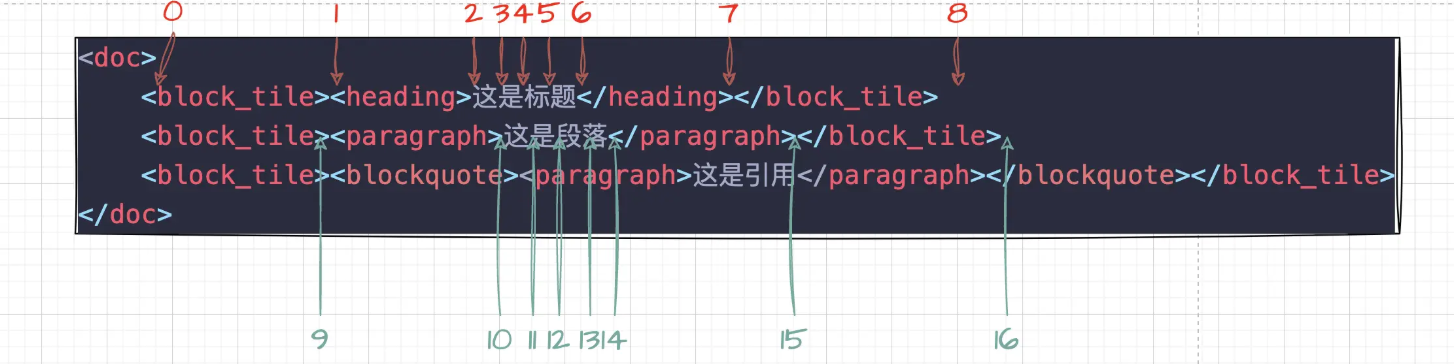
Prosemirror 中的光标系统是基于 Node 算的
选区

Prosemirror 中的 Selection

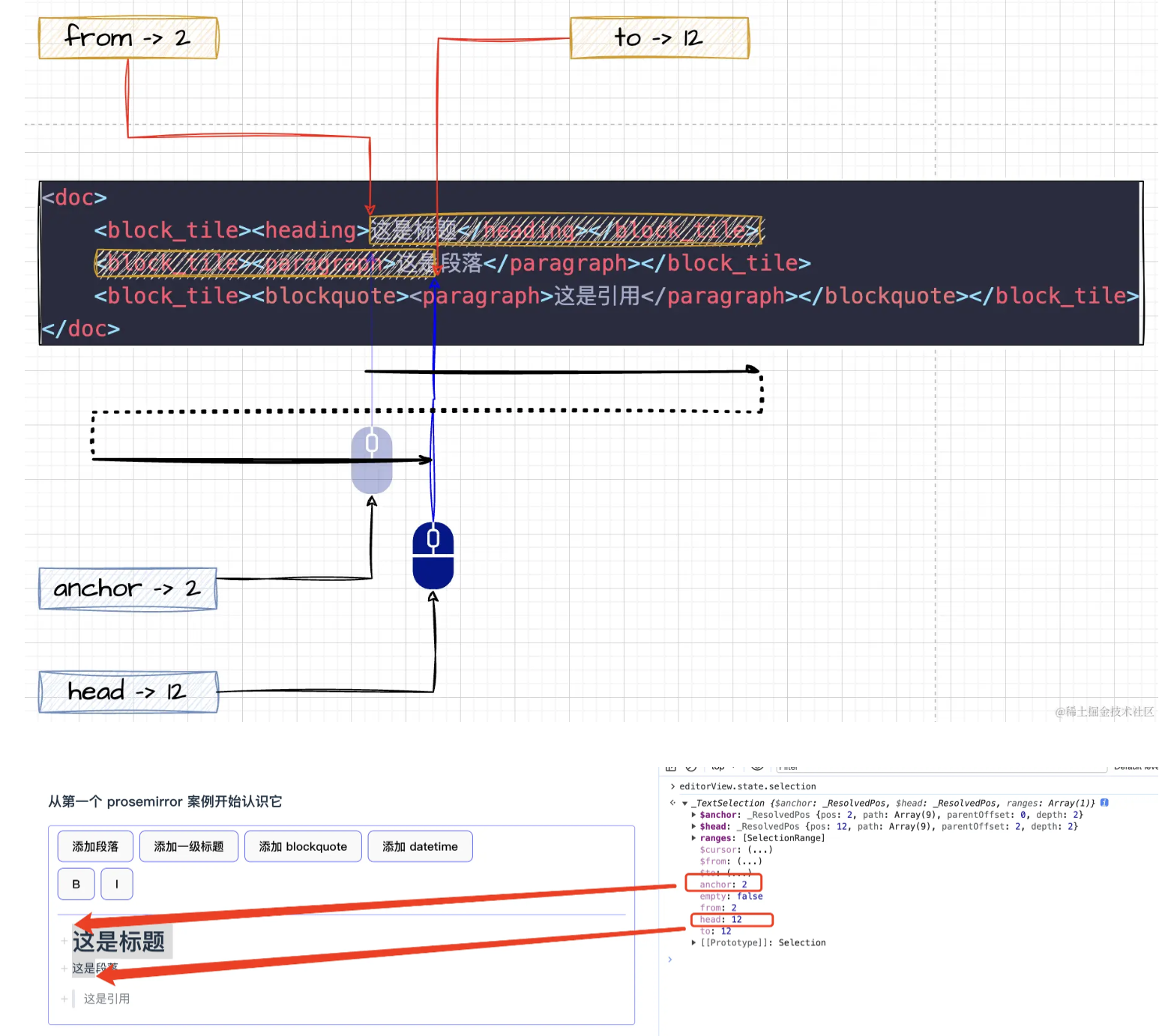
鼠标开始点击的地方叫做 anchor 锚点(下锚定住的基本点),鼠标选择结束后停止的地方叫做 head 头部

还有 from 与 to,是不分方向的,from 始终是小的那一边,to 始终是大的那一边
selection

当仅仅是光标时,这几个值都是相同的,并且 empty 时 true。

还有一套带 $ 符号,命名相同的变量,存在当前这个 pos 位置的更丰富的信息:例如当前位置的 depth,pos,父元素 parent,后面一个节点 nodeAfter, 前面一个节点 nodeBefore,以及 path 当前节点的路径等。通常需要根据一个位置快速获取到当前位置的节点是什么,这个 api 计算的结果就很有用

Range 与 Selection 的区别

Plugin

原文:https://prosemirror.net/docs/ref/#state.Plugin_System

Command是什么

本质上是个函数签名,绑定事件,拦截事件,修改ProseMirror视图

1
2
3
4
5
6
7
8
9
10
11
/// Commands are functions that take a state and a an optional
/// transaction dispatch function and...
///
/// - determine whether they apply to this state
/// - if not, return false
/// - if `dispatch` was passed, perform their effect, possibly by
/// passing a transaction to `dispatch`
/// - return true
///
/// In some cases, the editor view is passed as a third argument.
export type Command = (state: EditorState, dispatch?: (tr: Transaction) => void, view?: EditorView) => boolean
Command实现原理

在 Prosemirror 中,将 Command 定义为一种类型是为了给大家提供一个命令的标准或协议,即一种规范,但并没有实际实现它。Command 的实现是在 prosemirror-keymap 包中完成的,而 keymap 则是一个插件。使用起来非常简单,通过 {key: command} 的键值对将快捷键与命令绑定,按下对应的按键时,就会执行相应的 Command。

false:当前状态不满足
true:命令适用;若提供了 dispatch,则已完成修改

Plugin

Plugin组成

能力 作用

  • key: PluginKey
  • state: { init, apply }
  • props
  • view(view) => PluginView
  • filterTransaction
  • appendTransaction
Plugin生命周期
  • EditorState.create({ plugins: […] }):对每个插件调 state.init,得到初始插件状态。
  • 用户输入或代码 dispatch(tr):EditorState.apply(tr) 依次更新文档、选区、各插件 state.apply、以及插件里其它钩子约定。
  • new EditorView(…, { state }):对每个带 view 的插件创建 PluginView,之后每次文档/状态更新会调 PluginView.update(若存在)。
  • view.destroy():各 PluginView.destroy 做清理。

定制UI

ProseMirror中定制UI的方法

Schema中的toDOM

定义在schema里,实现简单

NodeView 和 MarkView

一个 NodeView 通常包括:

  • 创建 DOM — 返回 { dom, contentDOM? }
    • dom:这个节点对应的外层元素
    • contentDOM(可选):子内容(如段落里的文字)插在这里;没有则表示 atom 节点,内容不可编辑
  • 更新 — Node 的 attrs 变了,怎么更新 DOM
  • 选区 / 光标 — 点击、聚焦时的行为
  • 销毁 — 节点从文档移除时清理(解绑事件等)
  • (可选)忽略某些 mutation — 防止 ProseMirror 和你手动改的 DOM 冲突
1
2
3
4
5
6
7
8
9
10
11
12
13
14
15
16
17
18
19
20
21
22
23
function codeBlockViewConstructor(node, view, getPos) {
const dom = document.createElement('div')
dom.className = 'code-block-wrapper'

const pre = document.createElement('pre')
const code = document.createElement('code')
pre.appendChild(code)
dom.appendChild(pre)

// 可编辑区域:用户输入的 text 会渲染在 contentDOM 里
return {
dom,
contentDOM: code,
}
}

// 注册
new EditorView(root, {
state,
nodeViews: {
code_block: codeBlockViewConstructor,
},
})
Decoration 设置样式

Decoration(装饰) 是 ProseMirror 在 View 层 给文档某段位置「加视觉效果或额外 DOM」的机制。

  • Decoration.inline — 行内样式
  • Decoration.widget — 插入 DOM 小部件
  • Decoration.node — 整块节点样式

核心特点包括:

  • 不影响文档结构。不影响位置计算、node.textContent,只浮于表面
  • 每次tr的提交,decoration都会重新执行
  • 适合搜索高亮、拼写错误下划线、协作光标、评论锚点等 临时 UI
1
2
3
4
5
6
7
8
9
10
11
12
13
14
15
16
17
18
19
20
21
22
23
24
25
26
27
28
29
30
31
32
33
34
35
// 创建一个默认文本
var doc = schema.nodeFromJSON({
"type": "doc",
"content": [{
"type": "block_tile",
"content": [{
"type": "paragraph",
"content": [{
"type": "text",
"text": "123456789"
}]
}]
}]
})
// 加入到 state 中
const editorState = EditorState.create({
schema,
plugins: [
//...
],
doc
})

const editorView = new EditorView(editorRoot, {
state: editorState,
nodeViews: {
code_block: codeBlockViewConstructor
},
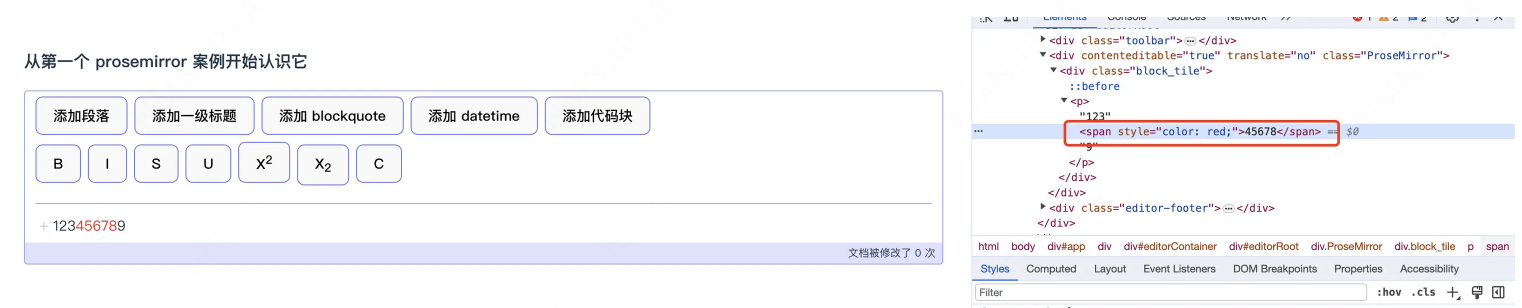
// editor View 中增加一个 decorations,通过 Decoration.inline 指定在位置 从 5 -> 10 的文本上,添加 style 样式,为红色
decorations(state) {
const decoration = Decoration.inline(5,10, { style: 'color: red' });
// 返回的 decoration 必须是个 DecorationSet
return DecorationSet.create(state.doc, [decoration]);
}
})

最终它的效果就是在 5 -> 10 的位置,将内容变为红色

decoration

实现代码块插件


Steps

原文:https://prosemirror.net/docs/ref/#transform.Steps

Steps的定义


Position Mapping


Document transforms

核心概念:原始 doc → 应用多个 Step → 新 doc


TipTap