Chrome新特性
| https://web.developers.google.cn/articles?hl=zh-cn
往返缓存bfcache(Chrome 96+)
bfcache 是什么
- bfcache(Back/Forward Cache,往返缓存)会在用户离开页面时,将整个页面快照(DOM、JS 堆状态、滚动位置等)保留在内存中,而不是完全销毁。
- 当用户点击浏览器后退/前进时,如果命中 bfcache,页面会直接恢复,通常不需要重新下载和重新执行首屏逻辑,体验接近瞬时返回。
相比 HTTP 缓存的优势
- HTTP 缓存主要缓存静态资源,页面仍可能要重新创建文档和执行脚本。
- bfcache 缓存的是「页面运行态」,恢复时不走完整加载链路,所以后退返回通常会明显更快。
bfcache工作原理
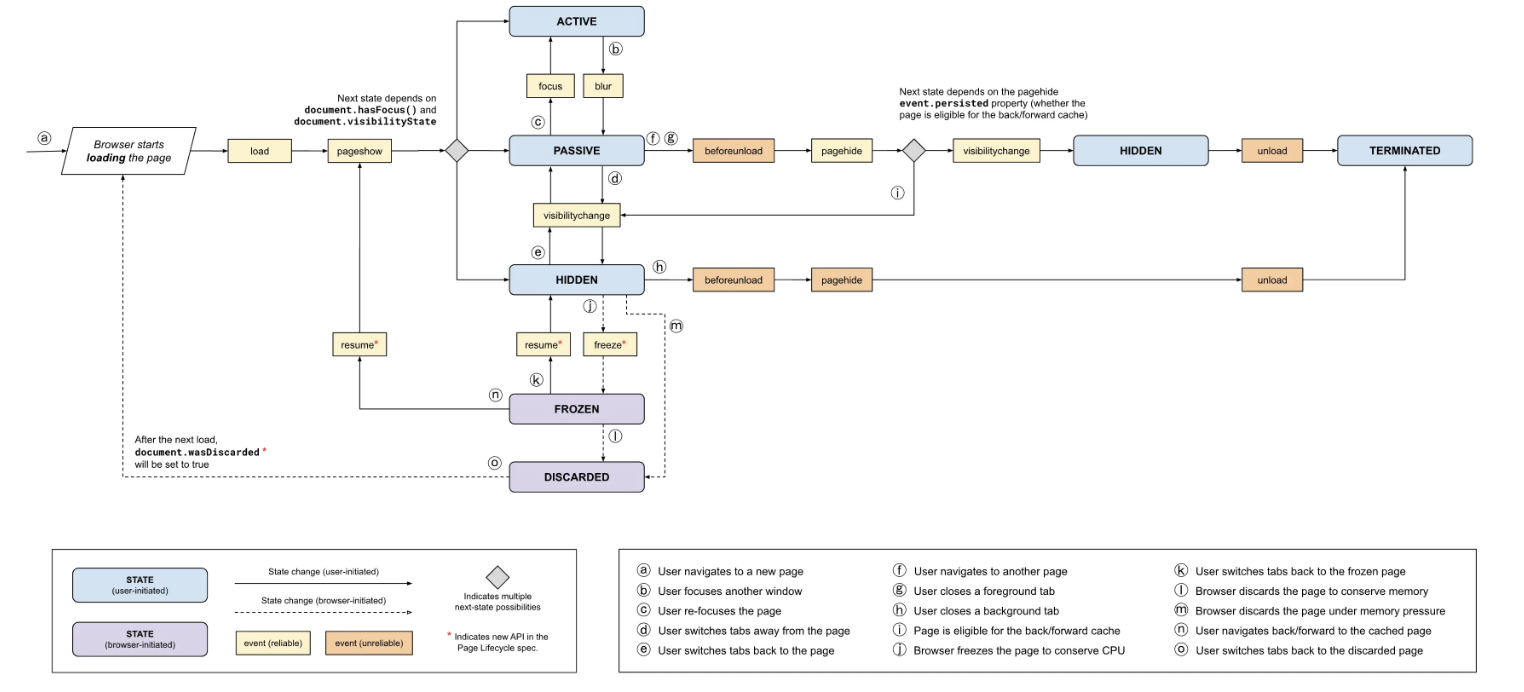
当用户尝试离开页面时,将会触发以下事件:
- beforeunload:用户可能会被提示确认导航。如果用户拒绝提示,导航将被中止。如果用户接受提示,导航将继续进行。
- visibilitychange(如果页面不是隐藏状态):页面可见性发生变化。
- pagehide:如果浏览器尝试将页面存储在 bfcache(后退/前进缓存)中,将触发此事件。否则,将触发 unload 事件。
在触发 freeze 事件后,页面将被冻结,直到从 bfcache 中恢复页面,将不会触发任何事件。如果在此期间与页面的文档关联的任务或 Promise 准备就绪,则它们将在页面从缓存中恢复后执行。
当页面位于缓存中时,浏览器随时可以决定将页面从缓存中清除,在这种情况下,页面将被销毁,而不会触发任何通知。
当再次导航到页面时,将触发以下事件:
- resume:恢复事件,表示页面从冻结状态恢复。
- pageshow:页面显示事件,表示页面从缓存中恢复并重新显示。
- visibilitychange(如果导航发生在可见选项卡中):页面可见性发生变化
实际应用场景
- 电商列表 -> 商品详情 -> 返回列表:保留滚动位置和筛选条件,避免再次请求整页列表。
- 文档站目录页 -> 文章页 -> 返回:目录页状态和展开项瞬时恢复,减少重复渲染。
- 管理后台表格页 -> 详情抽屉/详情页 -> 返回:分页、筛选器、滚动条状态不丢失。
- 搜索结果页 -> 详情页 -> 返回:用户可直接继续浏览上一位置,减少跳出。
如何判断页面是从bfcache恢复的
1 | window.addEventListener('pageshow', (event) => { |
如何判断页面可能被bfcache缓存
1 | window.addEventListener('pagehide', (event) => { |
以下情况,有些浏览器不会尝试将页面放入 bfcache
页面有监听 unload 或者 beforeunload 事件
可以使用 pagehide 事件来代替 unload 事件。pagehide 会在每次 unload 事件触发时被触发,并且在页面缓存到 bfcache 时也会触发。
1 | window.addEventListener("unload", function (event) { |
使用以下 API 也会影响 bfcache
- WebSocket或WebRTC 连接的页面
- IndexDB链接的页面
- 页面有正在进行的fetch或XMLHttpRequest的事件
如果页面正在使用这些 API 中的其中一个,最好总是在页面pagehide或freeze事件期间关闭连接并删除或断开观察者的连接。这样浏览器就可以安全地缓存页面,而不会影响其他打开的选项卡。
Html文件被设置成 no-store
HTMl文件Cache-Control: no-store时也不会命 bfcache
避免用 window.open 去打开需要 bfcache 的页面
通过 window.open 打开的页面以及自身都不符合命中 bfcache 的条件,具有非空window.opener引用的页面不能安全地放入 bfcache 中,因为这可能会破坏任何试图访问它的页面,尽可能使用rel=”noopener”` 去打开